HQ is the supervisor session gtmux hq starts. As it watches your agents it learns
things: that this office network resets TLS handshakes, that a command in this repo needs
a flag nobody remembers, that you asked twice for links to be plain URLs. Those go into a
knowledge base on your Mac. Selected machine-wide lessons can be promoted and synced
into supported agents’ instruction files, where new sessions can read their index.
This page covers where that base sits, how a lesson gets from “HQ noticed it” to “every agent on this machine reads it”, and what you can change yourself. Nothing here leaves your machine unless you send it somewhere.
Where it lives
Everything HQ owns is under ~/.config/gtmux/hq/, and one generated file sits outside it:
| Path | What it is | Who writes it |
|---|---|---|
hq/knowledge/.ledger.jsonl | the knowledge base itself: every entry, every change, append-only | HQ, through gtmux knowledge … |
hq/knowledge/*.md | the same entries rendered by topic, for reading | gtmux, overwritten on every render |
hq/knowledge/promotions/ | the take-away brief of an entry waiting to be carried somewhere | gtmux |
hq/knowledge/tools/ | scripts HQ wrote for itself, each named by one entry | HQ |
hq/AGENTS.md | HQ’s charter: how it works, shipped with gtmux | gtmux, replaced on update |
hq/LOCAL.md | your own standing rules | you; ordinary updates preserve it. HQ-targeted landing can append a section, and an explicit restore or migration can replace it |
hq/notes/board.md | HQ’s current picture of the fleet, not knowledge | HQ |
knowledge/machine.md | the handful of lessons every agent on this machine must know | gtmux, generated |
Two of those folders are called knowledge, but they serve different readers.
hq/knowledge/ holds HQ’s complete ledger; it is not automatically loaded into ordinary
project sessions. That is a distribution boundary, not filesystem isolation: an agent
with access to those files can read them when directed to them.
The normal machine-wide distribution path uses supported agents’ global instructions,
such as ~/.claude/CLAUDE.md for Claude Code. The generated index points at machine.md
for the selected lessons, rather than loading HQ’s whole base into every session.
The cost of not having it is easy to see. On a machine where rm is aliased to the
interactive version, an agent that runs it in a non-interactive shell fails silently: the
command looks like it ran and the file is still there. Recorded in the knowledge base
alone, that lesson stops nobody, because a new session is not automatically given that entry.
Carried out to machine.md and into each agent’s instruction file, it is in front of
new sessions using the synced instruction file from their first turn.
Most entries never travel this way. They are about how HQ itself works, and hundreds of
them in every agent’s context would crowd out the work, so this list stays short: a few
entries out of hundreds. Delete machine.md and the next sync writes it again.
Three layers, and which one is yours
Rules reach an agent from three places, and they are not interchangeable:
HQ’s charter AGENTS.md | Your rules LOCAL.md | This machine’s base knowledge/ | |
|---|---|---|---|
| Whose it is | gtmux’s | yours | this machine’s |
| Who writes it | the product, shipped with each release | you | HQ, as it works |
| When it applies | every session | every session | when it is relevant, or when HQ looks it up |
| Can you edit it | no, it is regenerated | yes, this is the place for that | through the commands below, not by hand |
LOCAL.md is imported at the end of the charter, so what you write there extends and
overrides what gtmux ships. If you want HQ to always do something, write it there. If you
want it to remember something it worked out, that is the base.
How a lesson travels
something happens → HQ records an entry → (optional) promote → landHQ writes an entry the moment it learns something durable: what happened,
how to tell it is happening again, what to do. Any agent can drop a one-line candidate
with gtmux capture "<lesson> @<topic>"; HQ decides what becomes an entry. Once a day
gtmux also reads the agents’ session logs, with no model involved, and queues the places
where you corrected someone or a tool failed repeatedly.
Most entries stay where they are. An entry stops being about this machine when it is about you, about every agent here, about one repository, or about gtmux itself, and HQ promotes it, saying who must know:
| Audience | Who reads it | Where it lands |
|---|---|---|
| HQ | HQ only | a section appended to your LOCAL.md |
| this machine | every agent on this Mac | knowledge/machine.md, plus a short block in each agent’s global instruction file |
| a repository | agents working in that repo | a block in that repo’s AGENTS.md (or existing CLAUDE.md when no AGENTS.md exists), written but never committed |
| everyone | all gtmux users | a pre-filled GitHub issue for you to open |
Promotion writes a brief. land without --ref carries it to the selected local
audience; land --ref records where you have already carried it. The common case is
“this machine”: your Claude Code, Codex, OpenCode and Kimi Code each get a block naming
the lessons and pointing at the full text, so a fresh session knows them without anyone
pasting anything. gtmux knowledge carriers shows each agent’s file
and whether it is current; gtmux doctor --fix repairs a stale one.
When an entry no longer applies, use retire with a reason. The ledger keeps the change.
When machine instructions are synced
Landing an entry for “this machine” generates ~/.config/gtmux/knowledge/machine.md
and refreshes the short index block in the global instruction files for Claude Code,
Codex, opencode, and Kimi Code. Ordinary entries stay in HQ’s knowledge base; they do
not automatically enter every agent’s instructions. Installing gtmux or running
gtmux update does not perform this sync. After an upgrade, run
gtmux knowledge sync if the blocks are stale, or use gtmux doctor --fix to check
and approve a repair. gtmux knowledge carriers lists the supported files and status.
The new index block also includes a short gtmux relay entry point supplied by gtmux;
it is not a knowledge entry promoted by HQ.
Sync changes only the text between the gtmux:knowledge markers and preserves text
outside the block. If someone edited the block by hand, sync refuses to overwrite it
unless you review it and use gtmux knowledge sync --force. Agents read their global
instructions when a new session starts; a running session does not reload them after
a sync. Other agent types currently have no global knowledge distribution channel.
Reading it and changing it
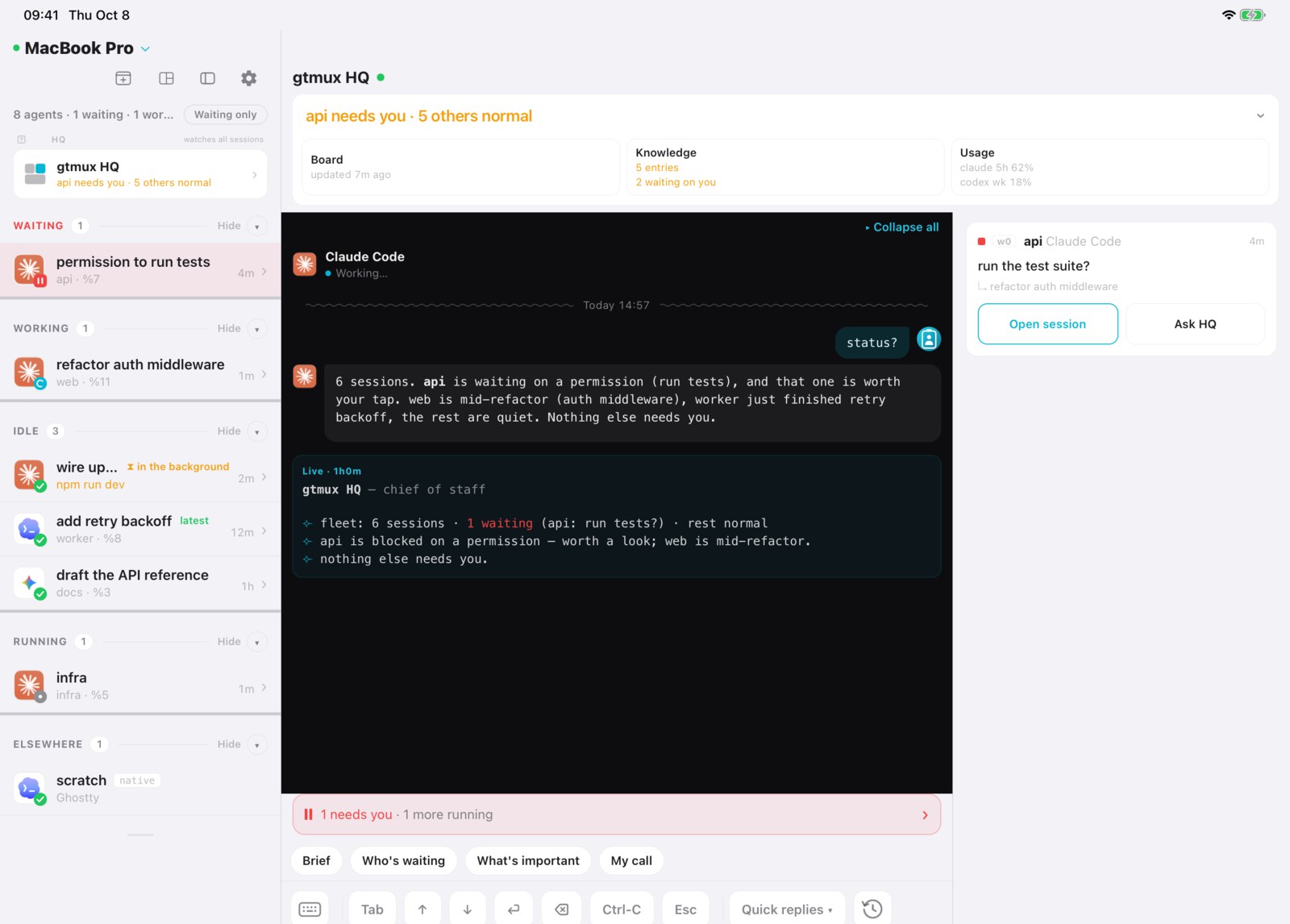
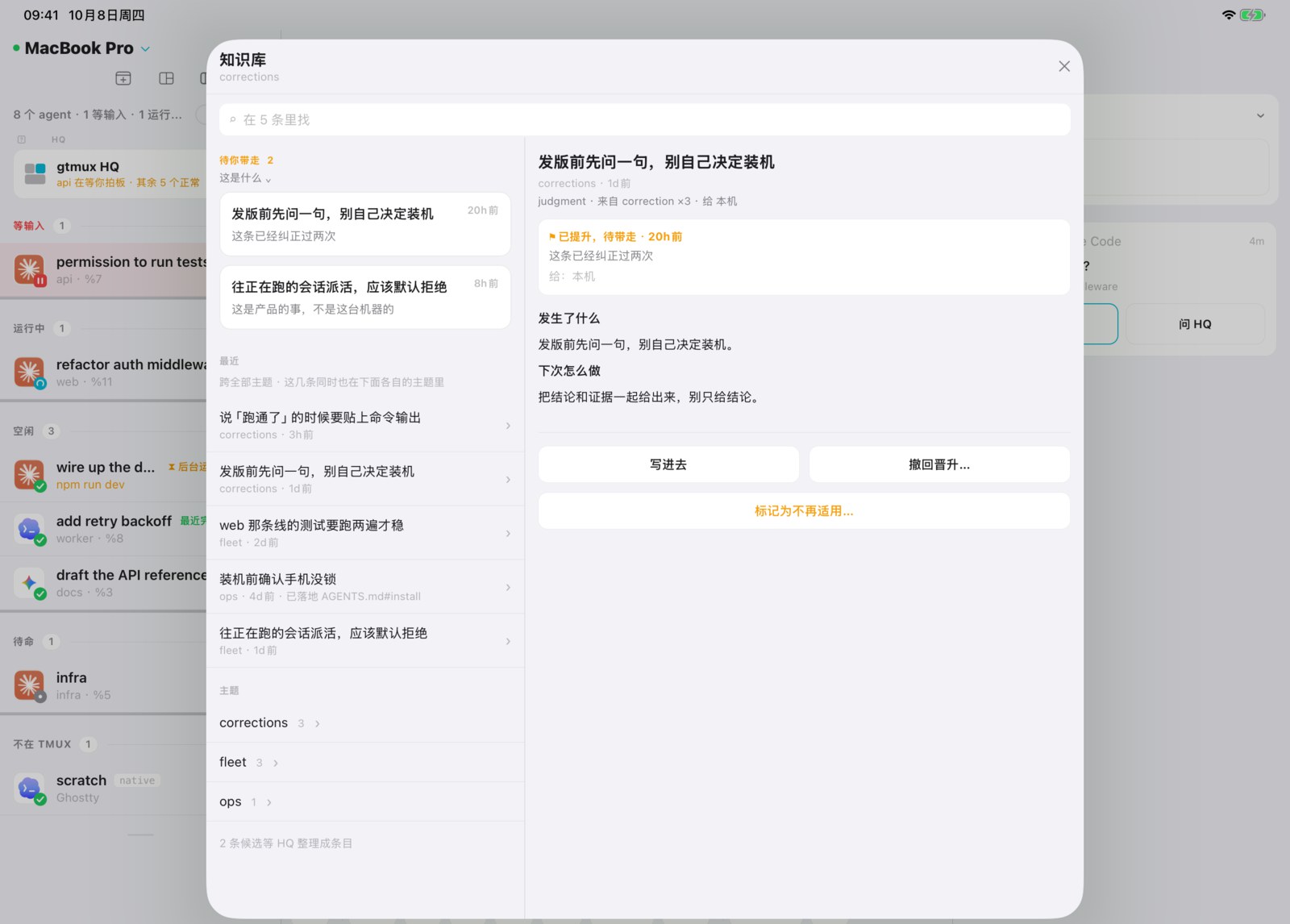
On the phone and iPad, open HQ and tap Knowledge.
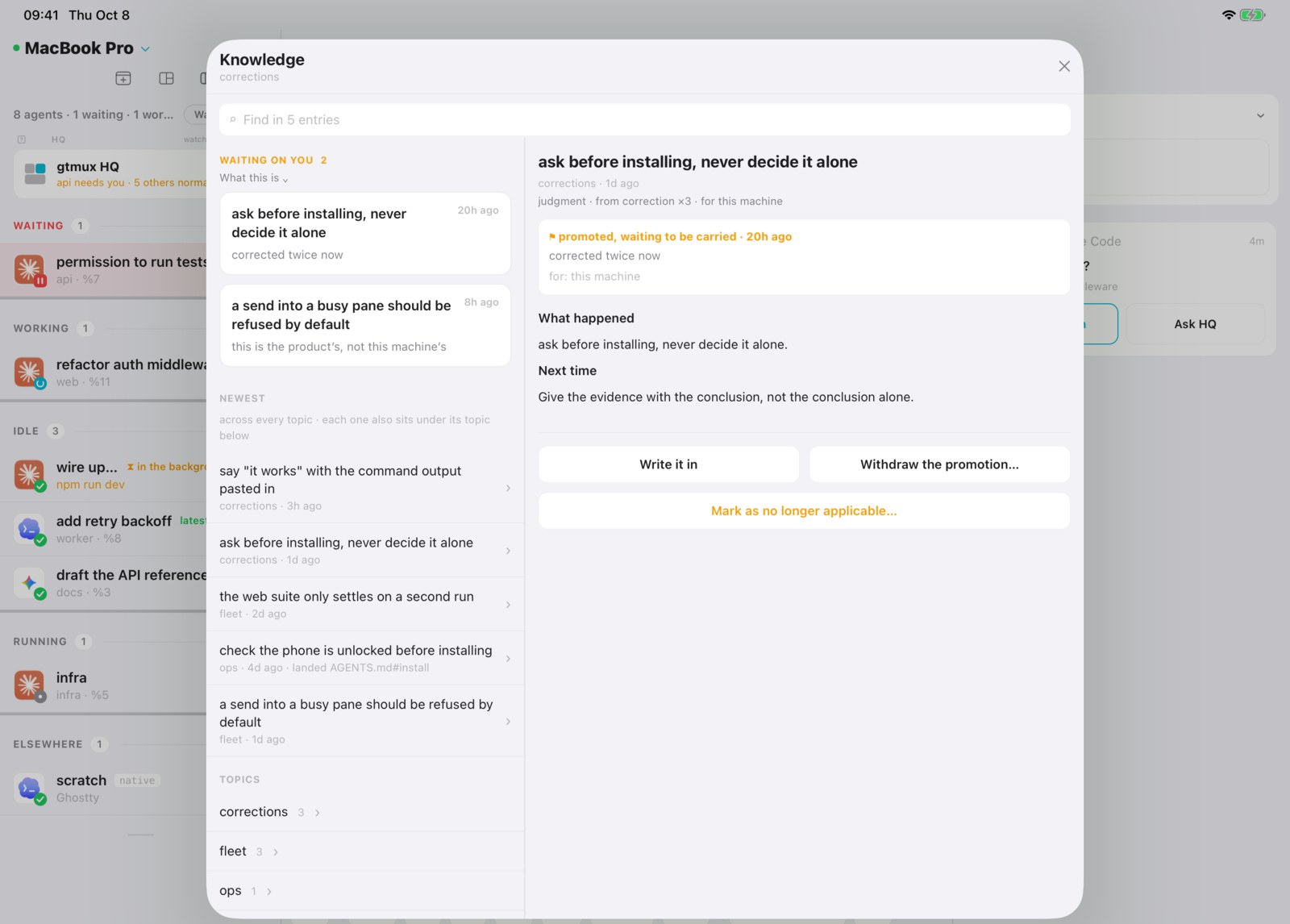
The knowledge list shows what is waiting on you first. Open an entry to read it.
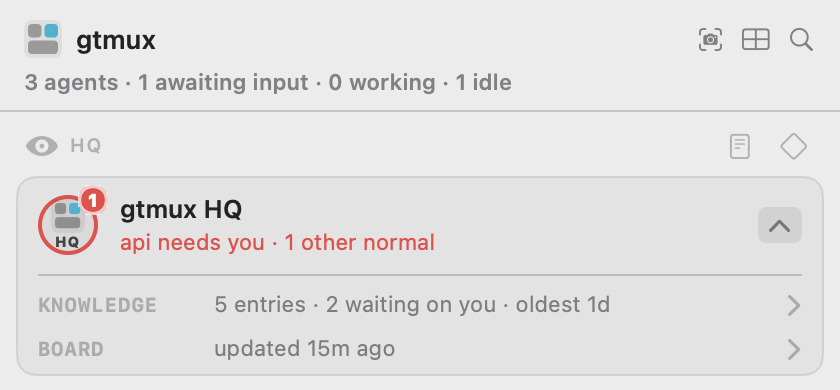
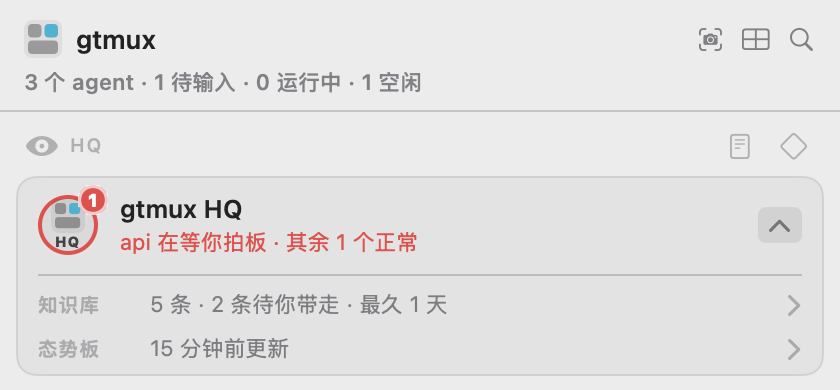
In the menu bar, expand the HQ card and click its KNOWLEDGE row to open the same list.
From the terminal:
gtmux knowledge list                 # every live entry
gtmux knowledge list --topic pitfalls
gtmux knowledge show <id>            # one entry in full
gtmux knowledge lint                 # issues and clearly labeled review/info hints; never edits
gtmux knowledge carriers             # which agents have the machine block, and is it current
gtmux knowledge promotions           # what is promoted and waiting to be carried
Changing it is HQ’s job and those verbs are its tools. Three of them you may want yourself:
gtmux knowledge retire <id> --why "the office network was fixed"
gtmux knowledge sensitive <id> --confirmed "<your own words>"   # keep it on this Mac
gtmux knowledge sync                                            # push the machine block out again
The everyday way to change what HQ knows is to tell HQ, in its own session, and let it write the entry. That keeps the reason, the provenance and the language halves intact, which is the part a hand edit loses.
Two languages
Every entry is written twice, in English and Chinese, each half written for that language’s reader rather than translated. Every surface shows you the half in your language and marks the entry when only the other half exists. A missing half is a counted backlog, never a reason not to record something.
Your own information
You can ask HQ to keep something personal: an account you use, a path that is yours, a
preference. Those entries are marked sensitive, and gtmux treats the mark as a hard rule:
they are never rendered into machine.md, never written into a repository block, never
part of an exported brief, and every surface shows them with a lock. HQ only marks an
entry sensitive after you say so, in your words, and it records your words.
gtmux does not upload the knowledge base automatically. gtmux hq --export creates an
encrypted backup you can save or transfer; gtmux hq --memory reports its size. In the
menu bar, HQ → Knowledge → Import… offers two separate actions:
- Restore HQ backup restores the complete HQ home, including the old board, and retains the current home as a separate backup.
- Move from another Mac selects live knowledge and its revision history, personal requirements, or tool attachments for staging only. Nothing starts checked. The old board, sessions, pending leads, built-in rules and connection credentials do not move.
Review knowledge before applying it; sensitive histories need a separate opt-in and old
audience decisions are reset. Compare personal requirements side by side; keeping current
is the default, replacement is a separate decision. Continue staged migration resumes
a review after closing. Exit HQ before apply or restore; idle is still running.
The CLI equivalent is gtmux hq migrate --help; --import remains a complete restore.
See Moving HQ for exact rules and limits.
If you want to read further
docs/cli.md has every command and flag. The design behind it, including why the layers are separate and what happens at each gate, is in docs/design/knowledge-layers.md.
Sources and processing receipts
Each candidate now has an observation ID and payload digest; its family key still groups related lines. Acceptance or dismissal commits all retained source text, context and available metadata to the ledger before excluding those IDs from the pending view. Validation or write failure keeps the work pending. New observations with the same key remain pending. Dismissals retain their reason without becoming knowledge entries.
Use gtmux knowledge show <id> --json for entry sources and
gtmux knowledge receipts --capture <key> --json for committed acceptances/dismissals.
Supersede retains source lineage; receipts survive retirement. Unknown source positions
stay unknown, and sources already discarded by earlier versions cannot be recovered.
The digest detects changed payload bytes; it is not a truth score. Raw context stays out
of indexes, generated rules, agent instruction blocks and public promotion briefs.
Failures are reported directly and correlated by op_id, outcome and phase in
events/diagnostics when those logs are writable. If an error says the operation committed
but rendering failed, inspect its receipt and run gtmux knowledge render; do not accept
the same observations again. Writes share a process lock and replace the file only after
a complete temporary copy is ready, using space proportional to that file. Newly written
ledger/archive files are private. Use the current CLI for queue processing: older versions
may truncate the source archive under their former queue semantics.
Source: docs/knowledge.md at v1.0.114 · Edit on GitHub
HQ 是 gtmux hq 起的那个参谋会话。它盯着你的 agent 干活,顺手把学到的东西记下来:
这个办公网会掐 TLS 握手、这个仓库里某条命令得带个没人记得住的参数、你说过两次给链接
要原始 URL。这些进了你 Mac 上的知识库。选给本机共同使用的条目经过晋升和同步,会写入受支持
agent 的指令文件索引,新会话从那里查阅。
这页讲的就是它:东西存在哪,一条经验怎么从「HQ 注意到了」走到「这台机器上每个 agent 都读得到」,以及你自己能改什么。除非你主动往外发,这里的东西不出这台机器。
存在哪
HQ 的东西都在 ~/.config/gtmux/hq/ 下面,另有一个自动生成的文件在它外面:
| 路径 | 是什么 | 谁写 |
|---|---|---|
hq/knowledge/.ledger.jsonl | 知识库本体:所有条目、所有改动,只追加 | HQ,通过 gtmux knowledge … |
hq/knowledge/*.md | 同一批条目按主题渲染出来,给人读的 | gtmux,每次渲染覆盖 |
hq/knowledge/promotions/ | 已晋升、等着被带走的条目的交接简报 | gtmux |
hq/knowledge/tools/ | HQ 给自己写的脚本,每个都有一条条目指着它 | HQ |
hq/AGENTS.md | HQ 的章程:它怎么干活,随 gtmux 发布 | gtmux,更新时整份换掉 |
hq/LOCAL.md | 你自己的长期规矩 | 你维护,普通更新保留;面向 HQ 的条目落地可追加分节,明确执行恢复或迁移时可替换 |
hq/notes/board.md | HQ 当前对舰队的判断,不算知识 | HQ |
knowledge/machine.md | 这台机器上每个 agent 都该知道的那几条 | gtmux,自动生成 |
两个目录都叫 knowledge,但服务的读者不同。hq/knowledge/ 保存 HQ 的完整台账,
不会自动装入普通项目会话。这是分发范围,不是文件权限隔离;能访问这些文件的 agent,
在得到路径或指示后也可以读取。
本机共同知识通常通过受支持 agent 的全局指令文件分发,例如 Claude Code 的
~/.claude/CLAUDE.md。生成的短索引指向 machine.md 中选出的条目,不会把 HQ 的整个
知识库装进每个会话。
没有它是什么代价,一个例子就够。本机把 rm 换成了会问一句 y/n 的版本,agent 在非交互
环境里执行它会静默失败:命令看起来跑过了,文件还在。这条教训只记在知识库里,拦不住任何人,
因为新会话不会自动拿到这条内容。推出去写进 machine.md、再进到各 agent 的配置里,它才会
出现在使用这份已同步指令的新会话中。
绝大多数条目不走这条路。它们讲的是 HQ 自己怎么干活,几百条全塞进每个 agent 的上下文只会
把正事挤掉,所以这份名单一直很短,几百条里挑出来几条。machine.md 删掉,下次同步会重建。
三层,哪一层是你的
规矩从三个地方到达一个 agent,三者不能互相顶替:
HQ 章程 AGENTS.md | 你的规矩 LOCAL.md | 本机知识库 knowledge/ | |
|---|---|---|---|
| 归谁 | gtmux 的 | 你的 | 这台机器的 |
| 谁写 | 产品写,随版本发 | 你写 | HQ 边干边写 |
| 什么时候生效 | 每次会话都在 | 每次会话都在 | 相关时才取,或 HQ 主动查 |
| 你能不能改 | 不能,它会被重新生成 | 能,这就是给你改的地方 | 走下面的命令,不要手改 |
LOCAL.md 在章程末尾被引入,所以你写在里面的东西会延伸并覆盖 gtmux 发的那份。想让
HQ 每次都照办的,写这儿;想让它记住自己摸索出来的,那是知识库。
一条经验怎么走完全程
出了点事 → HQ 记成一条 → (可选)晋升 → 落地HQ 一学到能复用的东西就写一条:发生了什么、怎么认出它又来了、该怎么办。
任何 agent 都可以用 gtmux capture "<一句教训> @<主题>" 随手丢一条候选,由 HQ 判断哪些
成条目。gtmux 每天还会不用模型地读一遍各 agent 的会话日志,把你纠正别人的地方、以及
反复失败的工具调用排进同一个队列。
多数条目就待在原地。当一条经验不再只关于这台机器,而是关于你本人、关于 这里所有 agent、关于某个仓库、或者关于 gtmux 本身时,HQ 会晋升它,并说清给谁看:
| 读者 | 谁会读到 | 落在哪 |
|---|---|---|
| HQ | 只有 HQ 自己 | 追加进你的 LOCAL.md |
| 本机 | 这台 Mac 上每个 agent | knowledge/machine.md,外加各 agent 全局指令文件里一个短块 |
| 某个仓库 | 在那个仓库里干活的 agent | 仓库 AGENTS.md 中的块;没有它而已有 CLAUDE.md 时写后者,只写文件不提交 |
| 所有人 | 全体 gtmux 用户 | 一个填好的 GitHub issue,等你去开 |
晋升写好简报。不带 --ref 的 land 会把条目写到指定的本地读者入口;带 --ref 时,
则记录你已经把它带到了哪里。日常常用的是「本机」这一档:
你的 Claude Code、Codex、OpenCode、Kimi Code 各自的全局指令文件里都会有一个块,列出这几条
并指向全文,新开的会话不用谁去粘贴就知道。gtmux knowledge carriers 能看到每个 agent 的
文件和是否最新,gtmux doctor --fix 补上过期的。
条目不再适用时,可以用 retire 标记并写明原因;台账会保留这次变更。
本机指令什么时候同步
HQ 把面向「本机」的条目 land 时,gtmux 会生成 ~/.config/gtmux/knowledge/machine.md,
并更新 Claude Code、Codex、OpenCode、Kimi Code 全局指令文件里的短索引块。普通条目只留在
HQ 知识库里,不会自动进入所有 agent 的指令。安装 gtmux 或运行 gtmux update 本身不会
执行这次同步;升级后如果索引块过期,运行 gtmux knowledge sync,或用
gtmux doctor --fix 检查并确认修复。gtmux knowledge carriers 会列出支持的文件和状态。
新版索引块还附有简短的 gtmux relay 入口说明,它由 gtmux 提供,不是 HQ 晋升的知识条目。
同步只改 gtmux:knowledge 标记之间的内容,保留块外文字;块内若被手工修改,默认拒绝覆盖,
核对后才使用 gtmux knowledge sync --force。全局指令由 agent 在新会话启动时读取,已运行
的会话不会因为同步而自动重新加载。其他 agent 类型目前没有这条全局知识分发通道。
怎么看,怎么改
手机和 iPad 上打开 HQ,点「知识库」。
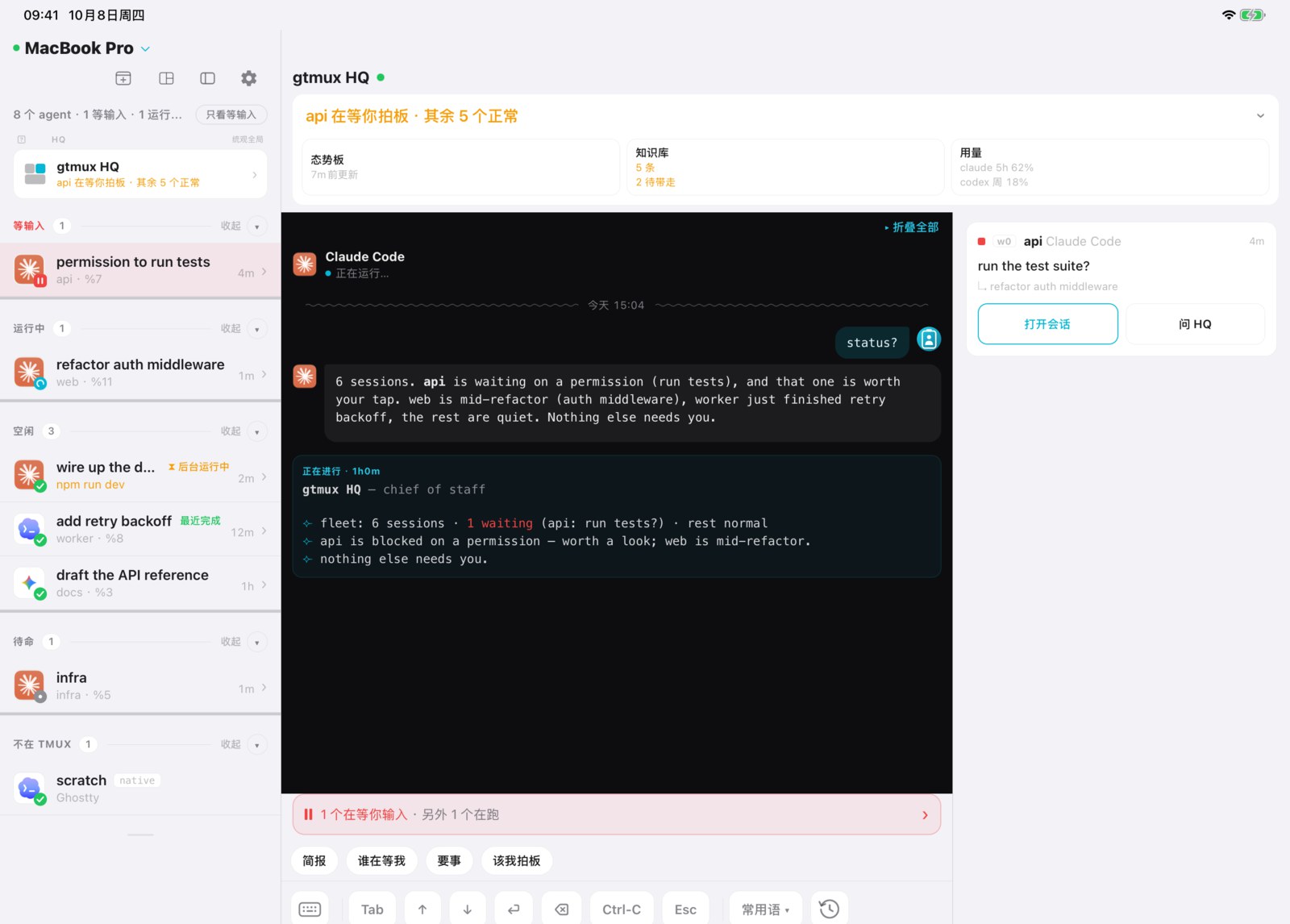
知识库列表优先显示需要你处理的条目,点一条即可查看正文。
菜单栏里展开 HQ 卡片,点「知识库」那一行,打开同一份列表。
终端里:
gtmux knowledge list                 # 所有在库条目
gtmux knowledge list --topic pitfalls
gtmux knowledge show <id>            # 看某一条全文
gtmux knowledge lint                 # 体检:区分问题、复核候选和信息提示;从不替你改
gtmux knowledge carriers             # 哪些 agent 装了本机块,是不是最新的
gtmux knowledge promotions           # 已晋升、还等着被带走的
改是 HQ 的活,那些动词是它的工具。其中三条你可能会想自己用:
gtmux knowledge retire <id> --why "办公网已经修好了"
gtmux knowledge sensitive <id> --confirmed "<你自己的原话>"   # 只留本机
gtmux knowledge sync                                          # 把本机块重新推一遍
日常改 HQ 知道什么,最省事的办法是直接在 HQ 的会话里跟它说,让它自己写条目。这样理由、 出处和两种语言的两半都还在,手改丢掉的正是这些。
两种语言
每条条目都写两遍,中英各一半,各按各自语言的读者写,不是逐字翻译。各个界面都给你你那 半份,只有另一半时会标出来。缺一半只是一个待补的计数,绝不因此就不记。
你自己的信息
你可以让 HQ 记你个人的东西:常用的账号、只有你有的路径、某个偏好。这类条目会被标成敏感,
gtmux 把这个标记当硬规矩:不渲染进 machine.md、不写进任何仓库的块、不进导出简报,
每个界面上都带一把锁。HQ 只有在你说了之后才标,而且会把你的原话记下来。
gtmux 不会自动上传知识库。gtmux hq --export 可生成加密副本,由你自行保存或传输;
gtmux hq --memory 可查看占用空间。菜单栏 HQ → 知识库 → 导入… 提供两个独立入口:
- 恢复 HQ 备份:还原整份 HQ 目录,包括旧态势板;当前目录另存为备份。
- 从另一台 Mac 迁移:选择当前知识及修订历史、个人要求,或仅暂存工具附件。 默认均不勾选;旧态势板、会话、待整理线索、内置规则和连接授权不迁移。
知识先进入核对界面,敏感历史需另行选择;核对后才应用,旧分发范围会清除。
个人要求并排核对,默认保留当前内容,替换需单独确认。中途关闭后可用
继续核对暂存内容 返回。应用或恢复前需退出 HQ,空闲也不算退出。
CLI 对应 gtmux hq migrate --help;--import 仍是整份恢复。
详细规则和限制见换机迁移。
想再往下读
docs/cli.zh.md 里有全部命令和参数。背后的设计,包括三层为什么要分开、 每道闸各管什么,在 docs/design/knowledge-layers.zh.md。
来源与处理回执
每次观察都有独立 ID 和内容摘要,同类线索仍用同一个 key 归组。采纳或驳回时,先将 保留下来的原文、上下文和可获得的来源信息提交到台账,再从待办视图排除这些 ID。 校验或写盘失败时,线索仍待处理;同一个 key 后来出现的新线索仍会进入队列。 驳回理由留在台账,但不会变成知识条目。
gtmux knowledge show <id> --json 提供条目来源;
gtmux knowledge receipts --capture <key> --json 提供已提交的采纳、驳回及其来源。
修订条目会沿用来源,条目退役后仍可查回执。缺失的来源位置表示未知;历史上已经丢弃的
来源无法补回。内容摘要用于检测文字是否改变,不代表事实可信度。原文上下文不会进入
索引、生成的规则、agent 指令块或公开推广简报。
失败由命令直接报告;日志可写时,事件和诊断日志还会用 op_id、outcome、phase
关联。若错误说明“已提交,但视图更新失败”,请先查回执,再执行
gtmux knowledge render,不要重复采纳。写入共用跨进程锁,完整的新文件就绪后才替换
原文件,临时空间与该文件大小相当;新写入的台账和来源档案仅允许当前用户访问。
请用当前版本处理队列,旧版本的队列清空逻辑可能截断来源档案。
来源:docs/knowledge.zh.md(v1.0.114)· 在 GitHub 上编辑